> ## Documentation Index
> Fetch the complete documentation index at: https://docs.meshconnect.com/llms.txt
> Use this file to discover all available pages before exploring further.

# Prepare for go-live

By the end of this guide, you'll have a production API key, a registered webhook URI, and your integration pointing at Mesh's production environment — ready to launch.

<Check>
  **Before you start**

  * Your integration is fully tested and working in sandbox
  * You've completed Mesh's business verification process (reach out to your Mesh representative if you haven't started this yet)
</Check>

## Register a production webhook callback URI

Production webhook events are separate from sandbox — registering a callback URI for sandbox doesn't carry over. Go to **Account > API keys > Webhooks > Production** in the Mesh dashboard to register your production callback URI. Setting up webhooks for the first time? See [Transfer status webhooks](/resources/webhooks) for full implementation details, including HMAC signature verification.

## Update to the latest SDK version

Mesh regularly puts out SDK updates and communicates changes in client slack channels. It's worth a quick check before go-live to ensure you're on the latest and greatest.

<div style={{ margin: "0.85rem 0" }}>
  <div style={{ display: "flex", alignItems: "center", gap: "0.5rem", marginBottom: "0.45rem", flexWrap: "wrap" }}>
    <span aria-hidden="true" style={{ fontSize: "16px", lineHeight: 1, flexShrink: 0 }}>🌐</span>
    <span style={{ fontWeight: 600 }}>Web</span>
    <span>:</span>
    <a href="https://github.com/FrontFin/mesh-web-sdk/tree/main/packages/link#meshconnectweb-link-sdk">mesh-web-sdk</a>
  </div>

  <div style={{ display: "flex", alignItems: "center", gap: "0.5rem", marginBottom: "0.45rem", flexWrap: "wrap" }}>
    <svg xmlns="http://www.w3.org/2000/svg" viewBox="0 0 24 24" fill="#888888" style={{ width: "16px", height: "16px", flexShrink: 0 }}>
      <path d="M12.152 6.896c-.948 0-2.415-1.078-3.96-1.04-2.04.027-3.91 1.183-4.961 3.014-2.117 3.675-.546 9.103 1.519 12.09 1.013 1.454 2.208 3.09 3.792 3.039 1.52-.065 2.09-.987 3.935-.987 1.831 0 2.35.987 3.96.948 1.637-.026 2.676-1.48 3.676-2.948 1.156-1.688 1.636-3.325 1.662-3.415-.039-.013-3.182-1.221-3.22-4.857-.026-3.04 2.48-4.494 2.597-4.559-1.429-2.09-3.623-2.324-4.39-2.376-2-.156-3.675 1.09-4.61 1.09zM15.53 3.83c.843-1.012 1.4-2.427 1.245-3.83-1.207.052-2.662.805-3.532 1.818-.78.896-1.454 2.338-1.273 3.714 1.338.104 2.715-.688 3.559-1.701" />
    </svg>

    <span style={{ fontWeight: 600 }}>iOS</span>
    <span>:</span>
    <a href="https://github.com/FrontFin/mesh-ios-sdk?tab=readme-ov-file#mesh-connect-ios-sdk">mesh-ios-sdk</a>
  </div>

  <div style={{ display: "flex", alignItems: "center", gap: "0.5rem", marginBottom: "0.45rem", flexWrap: "wrap" }}>
    <svg xmlns="http://www.w3.org/2000/svg" viewBox="0 0 24 24" fill="#3DDC84" style={{ width: "16px", height: "16px", flexShrink: 0 }}>
      <path d="M18.4395 5.5586c-.675 1.1664-1.352 2.3318-2.0274 3.498-.0366-.0155-.0742-.0286-.1113-.043-1.8249-.6957-3.484-.8-4.42-.787-1.8551.0185-3.3544.4643-4.2597.8203-.084-.1494-1.7526-3.021-2.0215-3.4864a1.1451 1.1451 0 0 0-.1406-.1914c-.3312-.364-.9054-.4859-1.379-.203-.475.282-.7136.9361-.3886 1.5019 1.9466 3.3696-.0966-.2158 1.9473 3.3593.0172.031-.4946.2642-1.3926 1.0177C2.8987 12.176.452 14.772 0 18.9902h24c-.119-1.1108-.3686-2.099-.7461-3.0683-.7438-1.9118-1.8435-3.2928-2.7402-4.1836a12.1048 12.1048 0 0 0-2.1309-1.6875c.6594-1.122 1.312-2.2559 1.9649-3.3848.2077-.3615.1886-.7956-.0079-1.1191a1.1001 1.1001 0 0 0-.8515-.5332c-.5225-.0536-.9392.3128-1.0488.5449zm-.0391 8.461c.3944.5926.324 1.3306-.1563 1.6503-.4799.3197-1.188.0985-1.582-.4941-.3944-.5927-.324-1.3307.1563-1.6504.4727-.315 1.1812-.1086 1.582.4941zM7.207 13.5273c.4803.3197.5506 1.0577.1563 1.6504-.394.5926-1.1038.8138-1.584.4941-.48-.3197-.5503-1.0577-.1563-1.6504.4008-.6021 1.1087-.8106 1.584-.4941z" />
    </svg>

    <span style={{ fontWeight: 600 }}>Android</span>
    <span>:</span>
    <a href="https://github.com/FrontFin/mesh-android-sdk?tab=readme-ov-file#mesh-connect-android-sdk">mesh-android-sdk</a>
  </div>

  <div style={{ display: "flex", alignItems: "center", gap: "0.5rem", marginBottom: "0.45rem", flexWrap: "wrap" }}>
    <svg xmlns="http://www.w3.org/2000/svg" viewBox="0 0 24 24" fill="#61DAFB" style={{ width: "16px", height: "16px", flexShrink: 0 }}>
      <path d="M14.23 12.004a2.236 2.236 0 0 1-2.235 2.236 2.236 2.236 0 0 1-2.236-2.236 2.236 2.236 0 0 1 2.235-2.236 2.236 2.236 0 0 1 2.236 2.236zm2.648-10.69c-1.346 0-3.107.96-4.888 2.622-1.78-1.653-3.542-2.602-4.887-2.602-.41 0-.783.093-1.106.278-1.375.793-1.683 3.264-.973 6.365C1.98 8.917 0 10.42 0 12.004c0 1.59 1.99 3.097 5.043 4.03-.704 3.113-.39 5.588.988 6.38.32.187.69.275 1.102.275 1.345 0 3.107-.96 4.888-2.624 1.78 1.654 3.542 2.603 4.887 2.603.41 0 .783-.09 1.106-.275 1.374-.792 1.683-3.263.973-6.365C22.02 15.096 24 13.59 24 12.004c0-1.59-1.99-3.097-5.043-4.032.704-3.11.39-5.587-.988-6.38-.318-.184-.688-.277-1.092-.278zm-.005 1.09v.006c.225 0 .406.044.558.127.666.382.955 1.835.73 3.704-.054.46-.142.945-.25 1.44-.96-.236-2.006-.417-3.107-.534-.66-.905-1.345-1.727-2.035-2.447 1.592-1.48 3.087-2.292 4.105-2.295zm-9.77.02c1.012 0 2.514.808 4.11 2.28-.686.72-1.37 1.537-2.02 2.442-1.107.117-2.154.298-3.113.538-.112-.49-.195-.964-.254-1.42-.23-1.868.054-3.32.714-3.707.19-.09.4-.127.563-.132zm4.882 3.05c.455.468.91.992 1.36 1.564-.44-.02-.89-.034-1.345-.034-.46 0-.915.01-1.36.034.44-.572.895-1.096 1.345-1.565zM12 8.1c.74 0 1.477.034 2.202.093.406.582.802 1.203 1.183 1.86.372.64.71 1.29 1.018 1.946-.308.655-.646 1.31-1.013 1.95-.38.66-.773 1.288-1.18 1.87-.728.063-1.466.098-2.21.098-.74 0-1.477-.035-2.202-.093-.406-.582-.802-1.204-1.183-1.86-.372-.64-.71-1.29-1.018-1.946.303-.657.646-1.313 1.013-1.954.38-.66.773-1.286 1.18-1.868.728-.064 1.466-.098 2.21-.098zm-3.635.254c-.24.377-.48.763-.704 1.16-.225.39-.435.782-.635 1.174-.265-.656-.49-1.31-.676-1.947.64-.15 1.315-.283 2.015-.386zm7.26 0c.695.103 1.365.23 2.006.387-.18.632-.405 1.282-.66 1.933-.2-.39-.41-.783-.64-1.174-.225-.392-.465-.774-.705-1.146zm3.063.675c.484.15.944.317 1.375.498 1.732.74 2.852 1.708 2.852 2.476-.005.768-1.125 1.74-2.857 2.475-.42.18-.88.342-1.355.493-.28-.958-.646-1.956-1.1-2.98.45-1.017.81-2.01 1.085-2.964zm-13.395.004c.278.96.645 1.957 1.1 2.98-.45 1.017-.812 2.01-1.086 2.964-.484-.15-.944-.318-1.37-.5-1.732-.737-2.852-1.706-2.852-2.474 0-.768 1.12-1.742 2.852-2.476.42-.18.88-.342 1.356-.494zm11.678 4.28c.265.657.49 1.312.676 1.948-.64.157-1.316.29-2.016.39.24-.375.48-.762.705-1.158.225-.39.435-.788.636-1.18zm-9.945.02c.2.392.41.783.64 1.175.23.39.465.772.705 1.143-.695-.102-1.365-.23-2.006-.386.18-.63.406-1.282.66-1.933zM17.92 16.32c.112.493.2.968.254 1.423.23 1.868-.054 3.32-.714 3.708-.147.09-.338.128-.563.128-1.012 0-2.514-.807-4.11-2.28.686-.72 1.37-1.536 2.02-2.44 1.107-.118 2.154-.3 3.113-.54zm-11.83.01c.96.234 2.006.415 3.107.532.66.905 1.345 1.727 2.035 2.446-1.595 1.483-3.092 2.295-4.11 2.295-.22-.005-.406-.05-.553-.132-.666-.38-.955-1.834-.73-3.703.054-.46.142-.944.25-1.438zm4.56.64c.44.02.89.034 1.345.034.46 0 .915-.01 1.36-.034-.44.572-.895 1.095-1.345 1.565-.455-.47-.91-.993-1.36-1.565z" />
    </svg>

    <span style={{ fontWeight: 600 }}>React Native</span>
    <span>:</span>
    <a href="https://github.com/FrontFin/mesh-react-native-sdk?tab=readme-ov-file#mesh-connect-react-native-sdk">mesh-react-native-sdk</a>
  </div>

  <div style={{ display: "flex", alignItems: "center", gap: "0.5rem", flexWrap: "wrap" }}>
    <svg xmlns="http://www.w3.org/2000/svg" viewBox="0 0 24 24" fill="#02569B" style={{ width: "16px", height: "16px", flexShrink: 0 }}>
      <path d="M14.314 0L2.3 12 6 15.7 21.684.013h-7.357zm.014 11.072L7.857 17.53l6.47 6.47H21.7l-6.46-6.468 6.46-6.46h-7.37z" />
    </svg>

    <span style={{ fontWeight: 600 }}>Flutter</span>
    <span>:</span>
    <a href="https://github.com/FrontFin/mesh-flutter-sdk?tab=readme-ov-file#requirements">mesh-flutter-sdk</a>
  </div>
</div>

## Generate a production API key

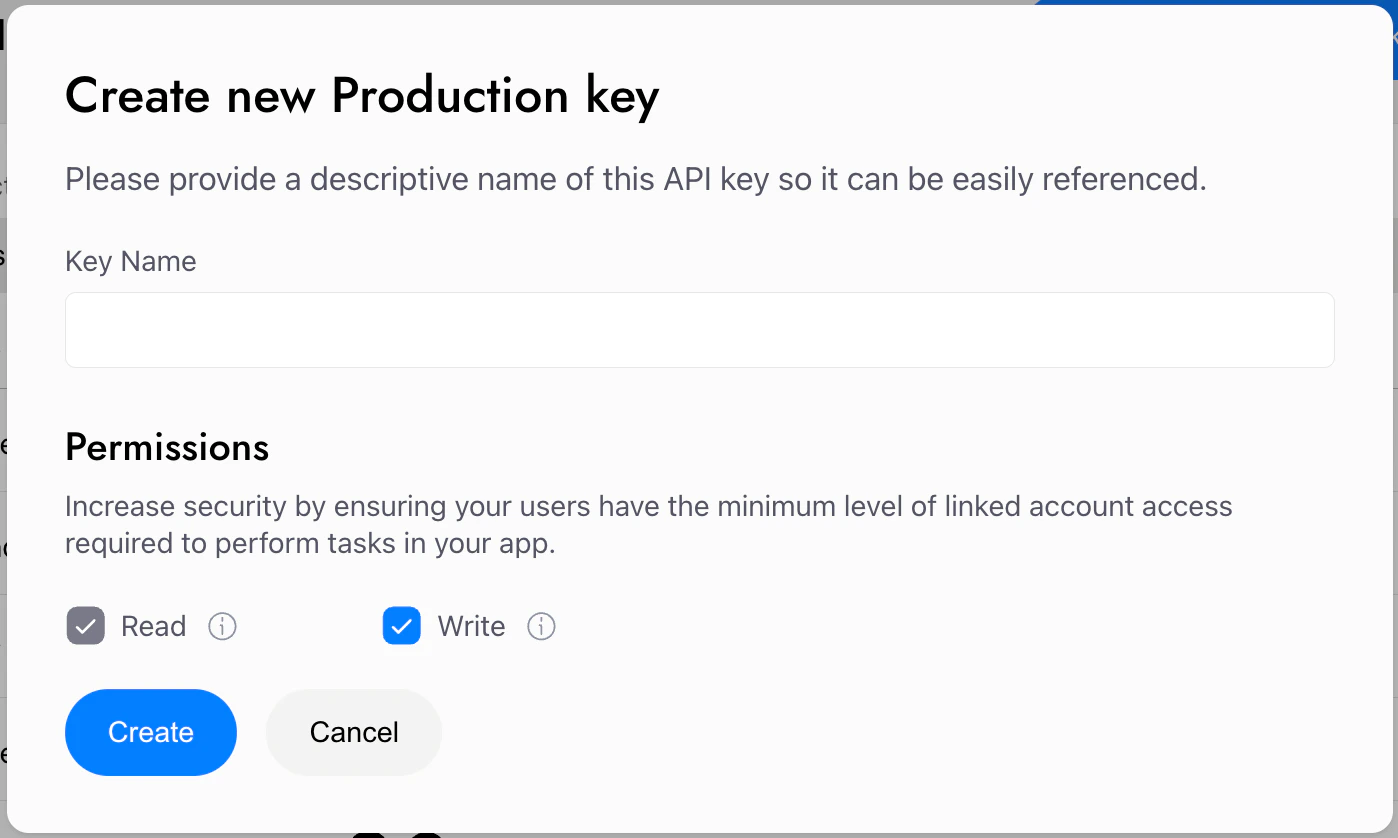
You can generate a production key in the Mesh developer dashboard in **Account > API keys**. You can grant each key Read-only permissions, or Read & Write (most common, and required for any use case involving transfers). If you haven't done so already, you'll need to complete the following first:

* Secure your account with 2FA
* Complete Mesh's business verification process
<Frame>
  <img src="https://mintcdn.com/mesh-40/Y-QnDCJ7fcNNqJ5o/images/image-24.png?fit=max&auto=format&n=Y-QnDCJ7fcNNqJ5o&q=85&s=e17b9970cc702cb2c9ed66fa5585639f" alt="Image" width="1398" height="838" data-path="images/image-24.png" />
</Frame>

## Point to Mesh's production environment

Now that you're set up for production, update your integration to point to Mesh's production base URL: [https://integration-api.meshconnect.com](https://integration-api.meshconnect.com).

## Let's test together

You should always thoroughly test the integration before going live, and we'd love to help. Ideally Mesh has a testing account in your app, is added to Testflight, etc. We've seen lots of Mesh implementations and have picked up plenty of tips and tricks along the way. Reach out to your Mesh representative to set up a testing session with the Mesh team — we want to make sure your launch goes smoothly.

## What's next

You're live! Once you're up and running, explore the **Extend** guides to unlock additional capabilities, or visit **Further resources** for API references and integration-specific docs.

***

<Accordion title="AI coding reference (llms.txt)">
  *AI coding reference — a compact summary of this page's APIs, parameters, and patterns for use by AI coding assistants (following the [llms.txt standard](https://llmstxt.org/)). Human readers can safely ignore this.*

  **llms.txt — Prepare for go-live**

  Three steps to launch in production: generate production API key → register production webhook URI → update base URL.

  **Production API key**: Dashboard > Account > API keys > API keys > Production. Prerequisites: 2FA enabled, allowed IP ranges added, Mesh business verification complete.

  **Production webhook URI**: Dashboard > Account > API keys > Webhooks > Production. Sandbox webhooks do not carry over — register separately. Only one production URI at a time (can deactivate and replace).

  **Production base URL**: `https://integration-api.meshconnect.com`

  (Sandbox: `https://sandbox-integration-api.meshconnect.com`)

  **Recommendation**: Schedule a joint testing session with your Mesh representative before launch.
</Accordion>
