> ## Documentation Index
> Fetch the complete documentation index at: https://docs.meshconnect.com/llms.txt
> Use this file to discover all available pages before exploring further.

# Transfer status webhooks

By the end of this guide, you'll have a working webhook endpoint that receives and verifies Mesh transfer status events — so you can reliably know when a transfer succeeds, fails, or is pending.

<Check>
  **Before you start**

  * You have a Mesh account with a sandbox API key (see [Prepare to build](/build/prepare-to-build))
  * You have a server with an endpoint that can receive POST requests from the public internet
</Check>

## Overview

If your business relies on transfer status to make business decisions (releasing inventory, allocating funds, etc.), then polling Mesh's managed transfers history endpoint ([/api/v1/transfers/managed/mesh](https://docs.meshconnect.com/api-reference/managed-transfers/get-transfers-initiated-by-mesh)) is an inefficient and ineffective solution. Mesh offers webhooks to solve this problem. A webhook is a callback function that allows lightweight, event-driven communication between two systems. In this case, the events are updates to transfer statuses. For an overview of how Mesh uses webhooks and how they differ from the `onTransferFinished` SDK callback, see [Concepts](/resources/concepts).

## Listen for Mesh webhook events

### 1. Create and register your callback URI

* Create an endpoint that can receive a POST request with application/json content.
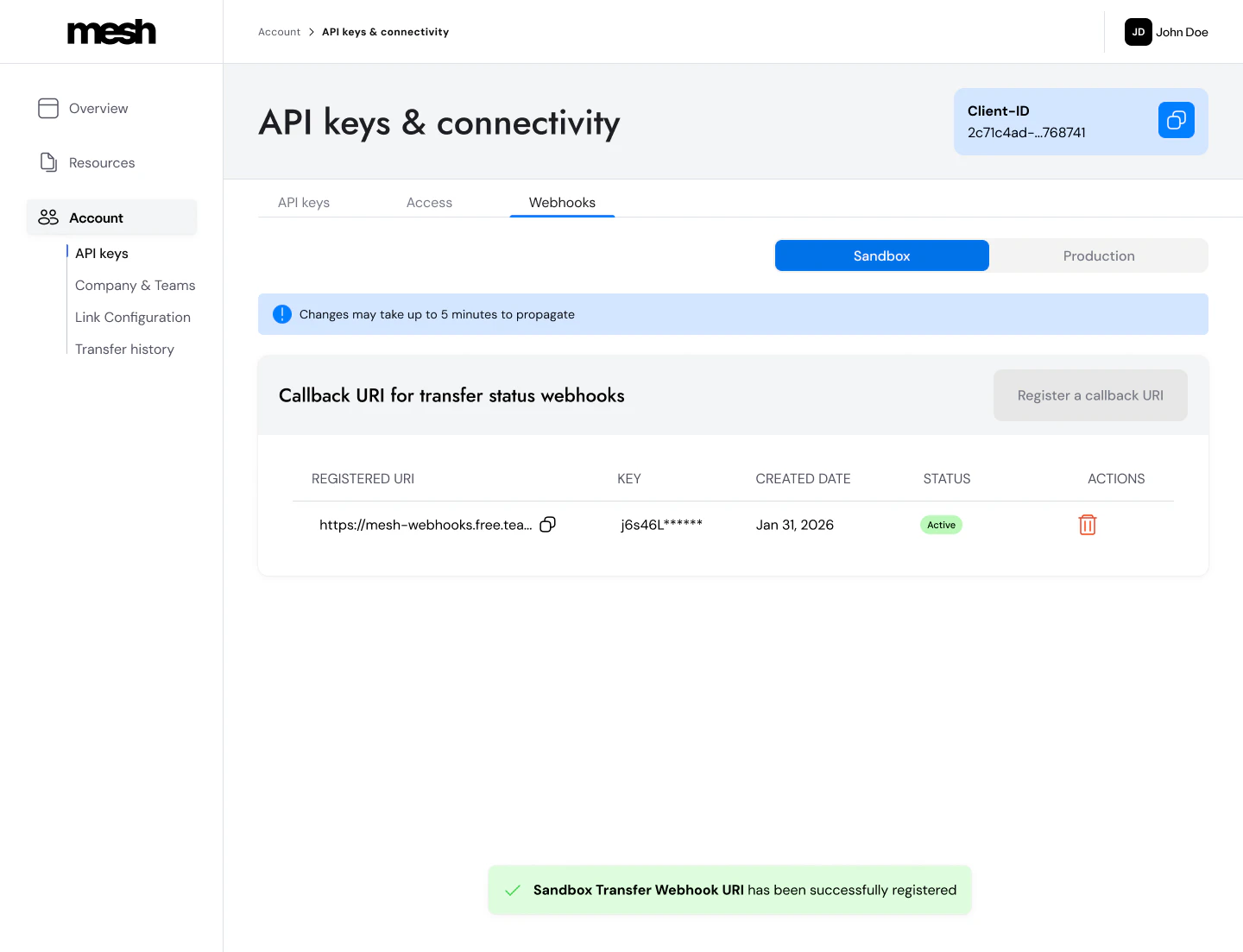
* In the Mesh developer dashboard, go to **Account > API keys > Webhooks**.
* Register a Callback URI for the appropriate environment.

<Frame>
  <img src="https://mintcdn.com/mesh-40/Y-QnDCJ7fcNNqJ5o/images/image-13.png?fit=max&auto=format&n=Y-QnDCJ7fcNNqJ5o&q=85&s=f95593708797cf86ce4040917687327b" alt="Image" width="1440" height="1103" data-path="images/image-13.png" />
</Frame>

**Notes:**

* When registering an endpoint, you'll be prompted to store your secret key, as you won't be able to view it again.
* You can only save one production URI and one sandbox URI, but you can deactivate one and save a new one at any time.

### 2. Whitelist Mesh's IP

* All webhook events will come from this static IP: `20.22.113.37`

### 3. Verify the signature

Mesh uses HMAC-SHA256 (Hash-based Message Authentication Code) to sign each webhook event. When you register your Webhook URI, you receive a secret key from Mesh. Mesh uses this key to sign each outgoing request and includes the result in the `X-Mesh-Signature-256` header. You verify the signature on your end using the same secret to confirm the payload is authentic and hasn't been tampered with.

Compute an HMAC-SHA256 over the **raw request body** using your webhook secret, Base64-encode the result, and compare it to the value in the `X-Mesh-Signature-256` header.

<div style={{ margin: "1rem 0", padding: "0.95rem 1rem", borderRadius: "0.9rem", border: "1px solid rgba(248, 113, 113, 0.24)", background: "rgba(127, 29, 29, 0.14)", color: "rgb(252, 165, 165)" }}>
  <div style={{ display: "flex", alignItems: "flex-start", gap: "0.7rem" }}>
    <span aria-hidden="true" style={{ fontSize: "1rem", lineHeight: 1.2, marginTop: "0.1rem" }}>⚠️</span>

    <div>
      <strong>Use the raw request body bytes — not parsed/re-serialized JSON.</strong> Parsing the body first then re-serializing it before computing the HMAC silently changes the byte sequence: JSON parsers can reorder keys, normalize decimal precision, or strip whitespace — producing a different result than what Mesh signed. In Node.js: use <code>express.raw()</code> instead of <code>express.json()</code>.
    </div>
  </div>
</div>

<Accordion title="C# example">
  ```csharp theme={null}
  public string GenerateHmacSignature(string payload, string webhookSecret)
  {
      using var hmac = new HMACSHA256(Encoding.UTF8.GetBytes(webhookSecret));
      byte[] hash = hmac.ComputeHash(Encoding.UTF8.GetBytes(payload));
      return Convert.ToBase64String(hash);
  }
  ```
</Accordion>

<Accordion title="Node.js (Express) example">
  ```javascript theme={null}
  app.post('/webhook', express.raw({ type: '*/*' }), (req, res) => {
    const rawBody = req.body;
    const receivedSig = req.headers['x-mesh-signature-256'];
    const computedSig = crypto
      .createHmac('sha256', WEBHOOK_SECRET)
      .update(rawBody)
      .digest('base64');
    if (computedSig !== receivedSig) return res.status(400).send('Invalid signature');
    res.sendStatus(200);
  });
  ```
</Accordion>

<Accordion title="Python (Flask) example">
  ```python theme={null}
  raw_body = request.get_data()
  received_sig = request.headers.get("X-Mesh-Signature-256")
  computed_sig = base64.b64encode(
      hmac.new(WEBHOOK_SECRET.encode(), raw_body, hashlib.sha256).digest()
  ).decode()
  if computed_sig != received_sig:
      return "Invalid signature", 400
  ```
</Accordion>

**Critical: always use the raw request body.** The HMAC is computed over the exact byte sequence of the HTTP request body — as received, before any parsing. A common mistake is parsing the JSON first and then re-serializing it before computing the HMAC. This silently changes the byte sequence: JSON parsers normalize decimal precision, reorder keys, or strip whitespace — producing a different result than what Mesh signed, and your verification will fail.

**Never:**

* Parse and re-serialize the JSON body before computing the HMAC
* Round or normalize decimal values (`SourceAmount`, `DestinationAmount`, etc.)
* Use `express.json()` middleware in Node.js without separately capturing the raw body (use `express.raw()` instead)

**Debugging tip:** If your signatures aren't matching, log these three things side-by-side: the raw request body as a string, the `X-Mesh-Signature-256` header value, and your locally computed HMAC. Comparing them directly will quickly surface where the divergence is.

### 4. Respond to Mesh webhook events

* Respond with a `200` response in \< 200ms to confirm receipt of the event.
* **Process the event asynchronously.** Return `200` immediately, then handle your business logic in a background process. If your handler does work before returning `200`, you risk exceeding the 200ms timeout.
* **Mesh does not guarantee exactly-once delivery.** Webhooks may be retried and delivered more than once — for example, if your server times out or returns a non-200 response. Design your handler to be idempotent: retries carry the same `EventId` but a new `Id` — use `EventId` as your idempotency key to safely deduplicate.

## Webhook Event Model

The webhook payload contains the core information related to a transfer update, and also includes additional fields specific to the webhook event.

### Webhook call data

<div className="parameter-reference">
  <Accordion title="Parameter reference">
    <div className="param-list">
      <div className="param-row">
        <div className="param-name"><code>EventId</code> <span className="param-tag">Guid</span></div>
        <div className="param-body">A unique identifier for the event. Stays the same across all retries — use this as your idempotency key to deduplicate.</div>
      </div>

      <div className="param-row">
        <div className="param-name"><code>Id</code> <span className="param-tag">Guid</span></div>
        <div className="param-body">A unique identifier for each individual webhook delivery attempt (`SentID`). A new `Id` is generated on every retry for the same event.</div>
      </div>

      <div className="param-row">
        <div className="param-name"><code>SentTimestamp</code> <span className="param-tag">long</span></div>
        <div className="param-body">Unix timestamp (seconds) indicating when the webhook was dispatched.</div>
      </div>
    </div>
  </Accordion>
</div>

### Transfer data

<div className="parameter-reference">
  <Accordion title="Parameter reference">
    <div className="param-list">
      <div className="param-row">
        <div className="param-name"><code>TransferId</code> <span className="param-tag">Guid</span></div>
        <div className="param-body">Mesh's unique identifier for the transfer.</div>
      </div>

      <div className="param-row">
        <div className="param-name"><code>Timestamp</code> <span className="param-tag">long</span></div>
        <div className="param-body">Unix timestamp (seconds) indicating when the transfer event occurred.</div>
      </div>

      <div className="param-row">
        <div className="param-name"><code>TransferStatus</code> <span className="param-tag">string</span></div>
        <div className="param-body">Transfer status at the time of this event. See Transfer Status Values below.</div>
      </div>

      <div className="param-row">
        <div className="param-name"><code>TransactionId</code> <span className="param-tag">string</span></div>
        <div className="param-body">The `transactionId` you provided in the Link Token request. Use this to match webhook events to transactions in your own system.</div>
      </div>

      <div className="param-row">
        <div className="param-name"><code>TxHash</code> <span className="param-tag">string</span></div>
        <div className="param-body">The blockchain transaction hash. Present on `succeeded` events; absent on `failed`.</div>
      </div>

      <div className="param-row">
        <div className="param-name"><code>UserId</code> <span className="param-tag">string</span></div>
        <div className="param-body">The `userId` you provided in the Link Token request.</div>
      </div>

      <div className="param-row">
        <div className="param-name"><code>Token</code> <span className="param-tag">string</span></div>
        <div className="param-body">Symbol of the transferred token (e.g. `USDC`, `ETH`).</div>
      </div>

      <div className="param-row">
        <div className="param-name"><code>Chain</code> <span className="param-tag">string</span></div>
        <div className="param-body">Name of the network the transfer occurred on (e.g. `Ethereum`, `Solana`).</div>
      </div>

      <div className="param-row">
        <div className="param-name"><code>SourceAmount</code> <span className="param-tag">decimal?</span></div>
        <div className="param-body">Token amount that left the source account. Always compute your HMAC over the **raw bytes** of this value — never parse/re-serialize the decimal, as precision changes will break signature verification.</div>
      </div>

      <div className="param-row">
        <div className="param-name"><code>SourceAccountProvider</code> <span className="param-tag">string</span></div>
        <div className="param-body">Name of the integration used to send the token (e.g. `Binance`, `MetaMask`).</div>
      </div>

      <div className="param-row">
        <div className="param-name"><code>DestinationAmount</code> <span className="param-tag">decimal?</span></div>
        <div className="param-body">Token amount received at the destination (after fees). May differ from `SourceAmount` if bridging or conversion occurred.</div>
      </div>

      <div className="param-row">
        <div className="param-name"><code>DestinationAddress</code> <span className="param-tag">string</span></div>
        <div className="param-body">The destination wallet address where funds were sent.</div>
      </div>

      <div className="param-row">
        <div className="param-name"><code>SourceAddress</code> <span className="param-tag">string</span></div>
        <div className="param-body">The address from which the transfer was posted to the blockchain. This is not the same as <code>RefundAddress</code> for centralized exchange transfers.</div>
      </div>

      <div className="param-row">
        <div className="param-name"><code>RefundAddress</code> <span className="param-tag">string</span></div>
        <div className="param-body">The address funds can be returned to. Save this for refund flows and compliance. See [Add Mesh to your withdrawal flow](/extend/withdrawal).</div>
      </div>
    </div>
  </Accordion>
</div>

### Transfer Status Values

<Accordion title="Status values">
  | Status      | Description                                                                                                                                  |
  | ----------- | -------------------------------------------------------------------------------------------------------------------------------------------- |
  | `pending`   | The transfer has been initiated via Mesh, but has not yet reached a final state. Mesh does not yet have a Transfer Hash for this transfer.   |
  | `succeeded` | A final state that indicates the transfer was successfully delivered to the destination address. Mesh has a Transfer Hash for this transfer. |
  | `failed`    | A final state that indicates the transfer has failed. No transfer hash available.                                                            |
</Accordion>

### Payload

The payload format is JSON. Here is an example.

```json theme={null}
{
  "Id": "358c6ab7-4518-416b-9266-c680fda3a8dd",
  "EventId": "56713e70-be74-4a37-0036-08da97f5941a",
  "SentTimestamp": 1720532648,
  "UserId": "user_id_provided_by_client",
  "TransactionId": "transaction_id_provided_by_client",
  "TransferId": "dd4063e5-f317-441c-3f07-08dc7353b6f8",
  "TransferStatus": "Pending",
  "TxHash": "0x7d4ec1ce50952a377452c95fdf5a787ff551f08c0343093f866c84f57c473495",
  "Chain":"Ethereum",
  "Token":"ETH",
  "DestinationAddress":"0x0Ff0000f0A0f0000F0F000000000ffFf00f0F0f0",
  "SourceAccountProvider" :"Binance",
  "SourceAmount":0.004786046226555188,
  "DestinationAmount":0.004786046226555188,
  "SourceAddress": "0x0Ff0000f0A0f0000F0F000000000ffFf00f0F0f0",
  "RefundAddress": "0x0Ff0000f0A0f0000F0F000000000ffFf00f0F0f0",
  "Timestamp": 1715175519038
}
```

## What's next

Now that your webhook endpoint is set up, see the [Polish the experience](/build/polish) guide for tips on using transfer status data to build a complete user-facing notification experience.

***

<Accordion title="AI coding reference (llms.txt)">
  *AI coding reference — a compact summary of this page's APIs, parameters, and patterns for use by AI coding assistants (following the [llms.txt standard](https://llmstxt.org/)). Human readers can safely ignore this.*

  **llms.txt — Transfer status webhooks**

  Receive, authenticate, and process Mesh transfer status events. Webhooks confirm on-chain transfer status (pending → succeeded/failed).

  **Setup**: (1) Register callback URI: Dashboard > Account > API keys > Webhooks. Save secret key — shown once only. (2) Whitelist Mesh IP: `20.22.113.37`. (3) Verify HMAC-SHA256 signature.

  **Signature verification**: Compute HMAC-SHA256 over **raw request body bytes** (never parse/re-serialize first). Base64-encode the result. Compare to `X-Mesh-Signature-256` header value.

  **Node.js/Express — HMAC verification pattern**:

  ```javascript theme={null}
  app.post('/webhook', express.raw({ type: '*/*' }), (req, res) => {
    const rawBody = req.body;
    const receivedSig = req.headers['x-mesh-signature-256'];
    const computedSig = crypto
      .createHmac('sha256', WEBHOOK_SECRET)
      .update(rawBody)
      .digest('base64');
    if (computedSig !== receivedSig) return res.status(400).send('Invalid signature');
    res.sendStatus(200);
  });
  ```

  **C# — HMAC-SHA256 verification**:

  ```csharp theme={null}
  public string GenerateHmacSignature(string payload, string webhookSecret)
  {
      using var hmac = new HMACSHA256(Encoding.UTF8.GetBytes(webhookSecret));
      byte[] hash = hmac.ComputeHash(Encoding.UTF8.GetBytes(payload));
      return Convert.ToBase64String(hash);
  }
  ```

  **Python (Flask) — HMAC-SHA256 verification**:

  ```python theme={null}
  raw_body = request.get_data()
  received_sig = request.headers.get("X-Mesh-Signature-256")
  computed_sig = base64.b64encode(
      hmac.new(WEBHOOK_SECRET.encode(), raw_body, hashlib.sha256).digest()
  ).decode()
  if computed_sig != received_sig:
      return "Invalid signature", 400
  ```

  **Response**: Return `200` in \< 200ms. Process event asynchronously after responding.

  **Idempotency**: `EventId` is stable across retries; `Id` changes per delivery attempt. Always deduplicate on `EventId`.

  **Webhook call data**: `EventId` | `Id` | `SentTimestamp`

  **Transfer data fields**: `TransferId` | `Timestamp` | `TransferStatus` (pending/succeeded/failed) | `TransactionId` (your ID) | `TxHash` (on succeeded) | `UserId` | `Token` | `Chain` | `SourceAmount` (decimal — compute HMAC over raw bytes, never re-serialize) | `SourceAccountProvider` | `DestinationAmount` | `DestinationAddress` | `SourceAddress` (blockchain posting address; differs from `RefundAddress` for CEX transfers) | `RefundAddress`

  **Statuses**: `pending` (initiated, no hash) | `succeeded` (final, on-chain confirmed, hash present) | `failed` (final, no hash)
</Accordion>