
Before you start
- You have a Mesh account with a sandbox API key (see Prepare to build)
- You have a server with an endpoint that can receive POST requests from the public internet
Overview
If your business relies on transfer status to make business decisions (releasing inventory, allocating funds, etc.), then polling Mesh’s managed transfers history endpoint (/api/v1/transfers/managed/mesh) is an inefficient and ineffective solution. Mesh offers webhooks to solve this problem. A webhook is a callback function that allows lightweight, event-driven communication between two systems. In this case, the events are updates to transfer statuses. For an overview of how Mesh uses webhooks and how they differ from theonTransferFinished SDK callback, see Concepts.
Listen for Mesh webhook events
1. Create and register your callback URI
- Create an endpoint that can receive a POST request with application/json content.
- In the Mesh developer dashboard, go to Account > API keys > Webhooks.
- Register a Callback URI for the appropriate environment.
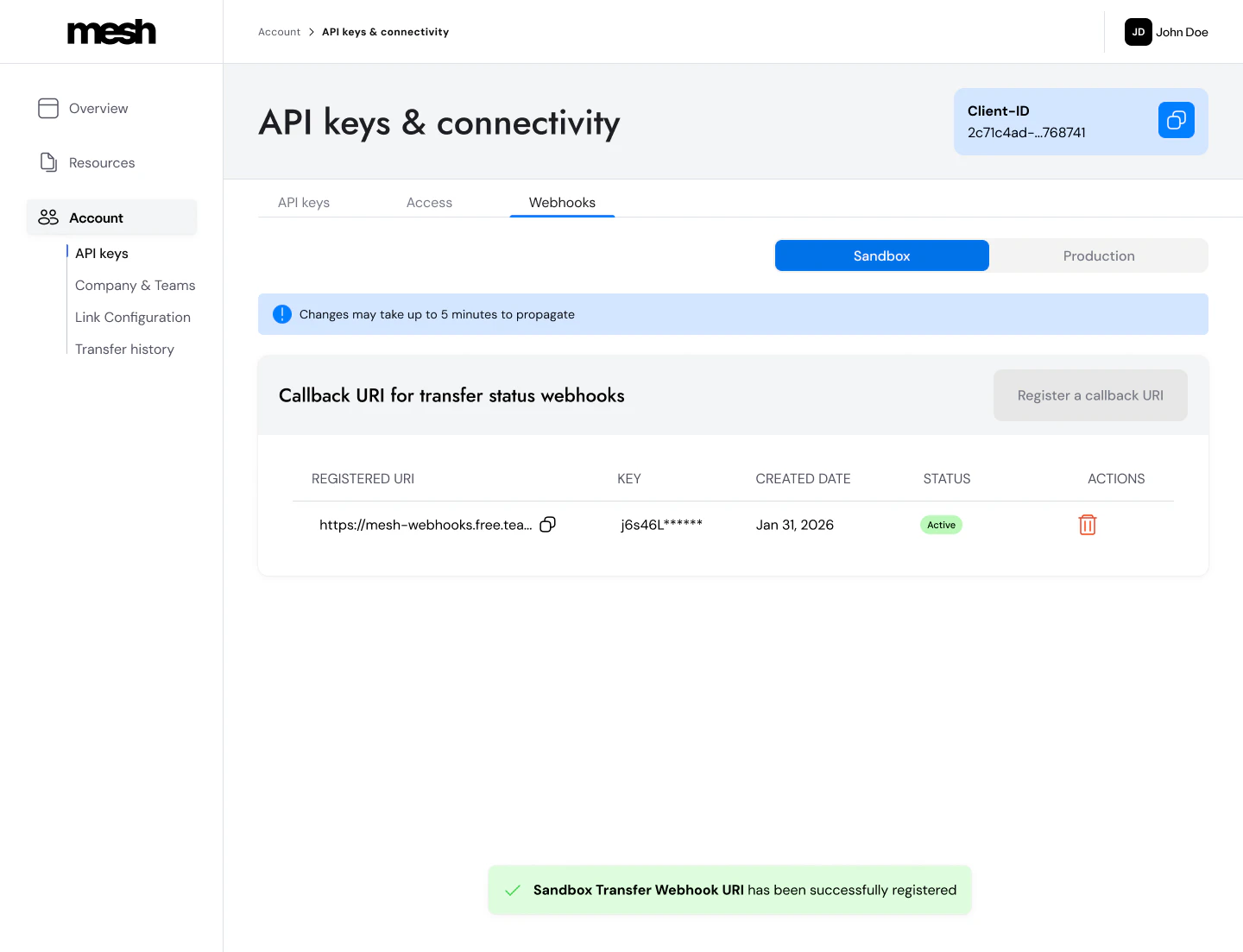
- When registering an endpoint, you’ll be prompted to store your secret key, as you won’t be able to view it again.
- You can only save one production URI and one sandbox URI, but you can deactivate one and save a new one at any time.
2. Whitelist Mesh’s IP
- All webhook events will come from this static IP:
20.22.113.37
3. Verify the signature
Mesh uses HMAC-SHA256 (Hash-based Message Authentication Code) to sign each webhook event. When you register your Webhook URI, you receive a secret key from Mesh. Mesh uses this key to sign each outgoing request and includes the result in theX-Mesh-Signature-256 header. You verify the signature on your end using the same secret to confirm the payload is authentic and hasn’t been tampered with.
Compute an HMAC-SHA256 over the raw request body using your webhook secret, Base64-encode the result, and compare it to the value in the X-Mesh-Signature-256 header.
Use the raw request body bytes — not parsed/re-serialized JSON. Parsing the body first then re-serializing it before computing the HMAC silently changes the byte sequence: JSON parsers can reorder keys, normalize decimal precision, or strip whitespace — producing a different result than what Mesh signed. In Node.js: use
express.raw() instead of express.json().C# example
C# example
Node.js (Express) example
Node.js (Express) example
Python (Flask) example
Python (Flask) example
- Parse and re-serialize the JSON body before computing the HMAC
- Round or normalize decimal values (
SourceAmount,DestinationAmount, etc.) - Use
express.json()middleware in Node.js without separately capturing the raw body (useexpress.raw()instead)
X-Mesh-Signature-256 header value, and your locally computed HMAC. Comparing them directly will quickly surface where the divergence is.
4. Respond to Mesh webhook events
- Respond with a
200response in < 200ms to confirm receipt of the event. - Process the event asynchronously. Return
200immediately, then handle your business logic in a background process. If your handler does work before returning200, you risk exceeding the 200ms timeout. - Mesh does not guarantee exactly-once delivery. Webhooks may be retried and delivered more than once — for example, if your server times out or returns a non-200 response. Design your handler to be idempotent: retries carry the same
EventIdbut a newId— useEventIdas your idempotency key to safely deduplicate.
Webhook Event Model
The webhook payload contains the core information related to a transfer update, and also includes additional fields specific to the webhook event.Webhook call data
Parameter reference
Parameter reference
EventId GuidA unique identifier for the event. Stays the same across all retries — use this as your idempotency key to deduplicate.
Id GuidA unique identifier for each individual webhook delivery attempt (
SentID). A new Id is generated on every retry for the same event.SentTimestamp longUnix timestamp (seconds) indicating when the webhook was dispatched.
Transfer data
Parameter reference
Parameter reference
TransferId GuidMesh’s unique identifier for the transfer.
Timestamp longUnix timestamp (seconds) indicating when the transfer event occurred.
TransferStatus stringTransfer status at the time of this event. See Transfer Status Values below.
TransactionId stringThe
transactionId you provided in the Link Token request. Use this to match webhook events to transactions in your own system.TxHash stringThe blockchain transaction hash. Present on
Succeeded events, and may also appear on Pending events once the transaction is on-chain; absent on Failed. For multi-step transfers, this matches the final step (the one that settles to DestinationAddress).UserId stringThe
userId you provided in the Link Token request.Token stringSymbol of the token received at the destination. For multi-step transfers (bridge or swap), this reflects the destination leg — what the user receives, not what they sent.
Chain stringName of the destination network. For multi-step transfers (bridge or swap), this reflects the chain where funds arrive, not where they originated.
SourceAmount decimal?Token amount that left the source account. Always compute your HMAC over the raw bytes of this value — never parse/re-serialize the decimal, as precision changes will break signature verification.
SourceAccountProvider stringName of the integration used to send the token (e.g.
Binance, MetaMask).DestinationAmount decimal?Token amount received at the destination (after fees). May differ from
SourceAmount if bridging or conversion occurred. See TransferSteps for the per-hop tx hashes.DestinationAddress stringThe destination wallet address where funds were sent.
SourceAddress stringThe address from which the transfer was posted to the blockchain. This is not the same as
RefundAddress for centralized exchange transfers.RefundAddress stringThe address funds can be returned to. Save this for refund flows and compliance. See Add Mesh to your withdrawal flow.
RefundType stringHow a refund would be routed if one occurred (e.g.
OffChainConvert). Useful for refund flows and reconciliation.TransferSteps array?Ordered list of the onchain legs that compose a transfer. Populated when bridging or conversion (swap) is involved — including same-chain swaps; omitted or empty for single-step transfers. Each step contains
StepOrder (1-based position), Chain, Token, Amount (token amount moved in that step), TxHash, and SourceAddress on the originating step. Top-level SourceAmount/DestinationAmount describe the end-to-end transfer; TransferSteps gives you the per-hop amounts and tx hashes for tracing.Transfer Status Values
Status values
Status values
Payload
The payload format is JSON. Here are payload examples for each transfer shape.Single-step transfer
Single-step transfer
Multi-step transfer (bridging)
Multi-step transfer (bridging)
Swap (same-chain conversion)
Swap (same-chain conversion)
A same-chain swap:
ETH is converted to USDC on Ethereum. Chain and Token reflect the destination leg (USDC), while the source leg (ETH) appears in TransferSteps with its own per-step Amount.What’s next
Now that your webhook endpoint is set up, see the Polish the experience guide for tips on using transfer status data to build a complete user-facing notification experience.AI coding reference (llms.txt)
AI coding reference (llms.txt)
AI coding reference — a compact summary of this page’s APIs, parameters, and patterns for use by AI coding assistants (following the llms.txt standard). Human readers can safely ignore this.llms.txt — Transfer status webhooksReceive, authenticate, and process Mesh transfer status events. Webhooks confirm on-chain transfer status (Pending → Succeeded/Failed for Link flows; headless bridging emits terminal statuses only, no C# — HMAC-SHA256 verification:Python (Flask) — HMAC-SHA256 verification:Response: Return
Pending).Setup: (1) Register callback URI: Dashboard > Account > API keys > Webhooks. Save secret key — shown once only. (2) Whitelist Mesh IP: 20.22.113.37. (3) Verify HMAC-SHA256 signature.Signature verification: Compute HMAC-SHA256 over raw request body bytes (never parse/re-serialize first). Base64-encode the result. Compare to X-Mesh-Signature-256 header value.Node.js/Express — HMAC verification pattern:200 in < 200ms. Process event asynchronously after responding.Idempotency: EventId is stable across retries; Id changes per delivery attempt. Always deduplicate on EventId.Webhook call data: EventId | Id | SentTimestampTransfer data fields: TransferId | Timestamp | TransferStatus (Pending/Succeeded/Failed/RefundPending/RefundSucceeded) | TransactionId (your ID) | TxHash (present once the transfer is on-chain; matches the final step for multi-step transfers) | UserId | Token | Chain | SourceAmount (decimal — compute HMAC over raw bytes, never re-serialize) | SourceAccountProvider | DestinationAmount (may differ from SourceAmount if bridging or conversion occurred) | DestinationAddress | SourceAddress (blockchain posting address; differs from RefundAddress for CEX transfers) | RefundAddress | RefundType (e.g. OffChainConvert — how a refund would be routed) | TransferSteps (array, populated for multi-step/bridging transfers; omitted for single-step)Multi-step transfers (bridging & swaps): When bridging or conversion (swap) is involved — including same-chain swaps — TransferSteps contains an ordered list of onchain legs. Each step includes: StepOrder (1-based), Chain, Token, Amount (token amount moved in that step), TxHash, and SourceAddress (originating step only). Top-level SourceAmount = what left the source account end-to-end; DestinationAmount = what arrived at DestinationAddress after all bridging/conversion fees; top-level Token/Chain = the destination leg; top-level TxHash = the final step’s hash. For a same-chain swap the step count can be 1, with the source token in TransferSteps and the destination token at top level. Use TransferSteps to trace each hop on-chain individually.Statuses: Pending (initiated, hash may not be present yet) | Succeeded (final, on-chain confirmed, hash present) | Failed (final for Link flows, no hash; for headless bridging also sent when the bridging address expires unfunded, and a pay-in that settles after expiry triggers a follow-up Succeeded for the same TransferId — deduplicate on EventId and apply the event with the greater payload Timestamp) | RefundPending (refund initiated, not complete) | RefundSucceeded (final, funds refunded; top-level TxHash is the original transfer)